Anacron cron.daily not running my scripts
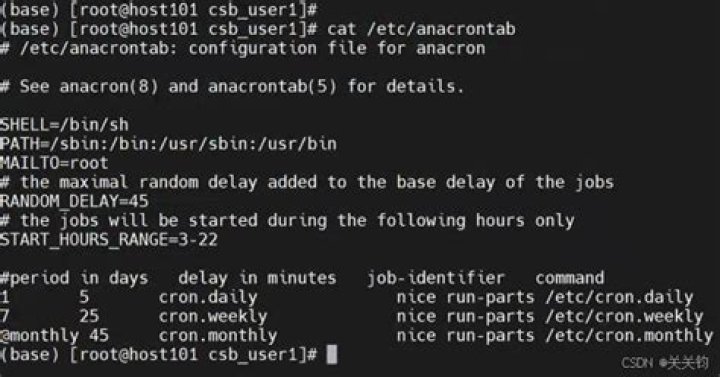
I am on Linux (Ubuntu) 16.04. I have a set of scripts in /etc/cron.daily which anacron handled. They used to run fine every day but I noticed that they were not running recently. I am not sure if it is because of an update or something else. It is driving me mad because I have tried everything I can think of without gaining results. Here is what I have checked so far:
1) grep "Nov 22" /var/log/syslog | grep "cron.daily" -B 5 -A 5:
Nov 22 06:24:47 ubuntu16 dbus[816]: [system] Successfully activated service 'org.freedesktop.nm_dispatcher'
Nov 22 06:24:47 ubuntu16 systemd[1]: Started Network Manager Script Dispatcher Service.
Nov 22 06:24:47 ubuntu16 nm-dispatcher: req:1 'dhcp4-change' [enp1s0]: new request (1 scripts)
Nov 22 06:24:47 ubuntu16 nm-dispatcher: req:1 'dhcp4-change' [enp1s0]: start running ordered scripts...
Nov 22 06:25:01 ubuntu16 CRON[6455]: (root) CMD (cupsenable HP-HP-OfficeJet-Pro-8710)
**Nov 22 06:25:01 ubuntu16 CRON[6456]: (root) CMD (test -x /usr/sbin/anacron || ( cd / && run-parts --report /etc/cron.daily ))**
Nov 22 06:30:01 ubuntu16 CRON[6485]: (root) CMD (cupsenable HP-HP-OfficeJet-Pro-8710)
Nov 22 06:35:01 ubuntu16 CRON[6513]: (root) CMD (cupsenable HP-HP-OfficeJet-Pro-8710)
Nov 22 06:39:01 ubuntu16 CRON[6536]: (root) CMD ( [ -x /usr/lib/php/sessionclean ] && /usr/lib/php/sessionclean)
Nov 22 06:40:01 ubuntu16 CRON[6583]: (root) CMD (cupsenable HP-HP-OfficeJet-Pro-8710)
Nov 22 06:45:01 ubuntu16 CRON[6612]: (root) CMD (cupsenable HP-HP-OfficeJet-Pro-8710)
So it appears that the cron.daily scripts are running or it least anacron tries to run it and there is no error in the syslog. I also checked and cron.daily has a log entry in the syslog for every day like it should.
2) I made sure my scripts were executable, ls -l /etc/:
-rwxr-xr-x 1 root root 139 Nov 20 16:24 bingbot
-rwxr-xr-x 1 root root 142 Nov 20 16:24 bingbotb
-rwxr-xr-x 1 root root 142 Nov 20 16:25 bingbotc
3) I also added a line in /etc/ before the call to my script that would create a file with the date it ran just to make sure it wasn't a problem with my script (echo "Time: $(date). BINGREWARDS SCRIPT RAN." >> /home/user/bingbot.txt) However, the next day it did not create the bingbot.txt so I know it didn't run.
4) I ran my script manually from the /etc/ and it worked perfectly and created a file with the date.
5) My script does not need sudo permisions.
6) Content of /etc/:
#!/bin/sh
echo "Time: $(date). BINGREWARDS SCRIPT RAN." >> /home/toshiba/bingbot.txt
python /home/user/Desktop/BingRewards/mainpy
7) UPDATE Tried running anacron manually sudo run-parts /etc/cron.daily which successfully ran my script. Interestingly...in the log I get:
Nov 22 17:01:14 ubuntu16 anacron[15605]: Anacron 2.3 started on 2017-11-22
Nov 22 17:01:14 ubuntu16 anacron[15605]: Can't open timestamp file for job cron.daily: Permission denied
Nov 22 17:01:14 ubuntu16 anacron[15605]: Aborted
After it finished I ran sudo run-parts /etc/cron.daily again and it did not give that error; it said Nov 22 17:35:55 ubuntu16 anacron[16777]: Updated timestamp for job cron.daily' to 2017-11-22 Maybe it was a permission error and it will start to work. But what could have caused this permission problem?
UPDATE2 Anacron failed to run the scripts today also. Same "Permission Denied" error as in log above. Also, the line in /etc/crontab executes anacron as root like it should:
25 6 * * * root test -x /usr/sbin/anacron || ( cd / && run-parts --report /etc/cron.daily )
UPDATE 3 After rebooting my computer the problem went away for ~3 days but then reappeared. On the 25th it said in syslog that cron.daily had terminated which seems like weird behavior. On the 26th however it seemed to work because it said in syslog that it had updated the time stamp. On the 27th it completely failed to run. This is insane. I can't figure out what is causing this.
What could be the reason that it does not run my script?
41 Answer
I had the same problem on EL6 (not debian), but the reason could be the same. I had the wrong permissions on /etc/ (wrong=chmod 600) due to a security script. I reinstalled cronie-anacron and it restored the execute bit(ie chmod 755) and it started working.
Notice that /usr/bin/run-parts does a check of whether the "parts" or files in /etc/cron.hourly are executable:
if [ -x $i ]; thennot whether they are readable... so watch permissions on these files. Also notice that anacron itself is actually run out of cron.hourly (even though the jobs you specified were daily)


