BOOT Error on (Failed to open \EFI\BOOT\mmx64.efi - Not found)
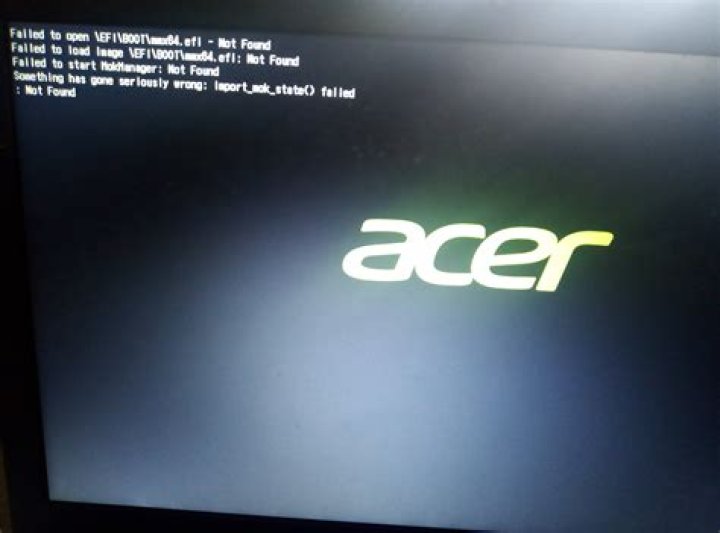
I had my office laptop (acer singleboot)at my home which i upgraded (sudo apt update) after a long time. ununtu eduunbuntu image (bootscreen)18.04. Then after i restart it is not booting.
Failed to open \EFI\BOOT\mmx64.efi - Not found
01 Answer
To fix this you will need to have a Live USB or Live DVD handy. Fortunately, it's not too difficult. Here's what you need to do:
Boot the machine using the Live USB / Live DVD and select "Try Ubuntu"
Once the Live session has finished booting, open a terminal
List the partitions on your notebook using
fdisk:sudo fdisk -lYou should see something like this:
Device Start End Sectors Size Type
/dev/nvme0n1p1 2048 2000895 1998848 976M EFI System
/dev/nvme0n1p2 2000896 936214527 934213632 445.5G Linux filesystem
/dev/nvme0n1p3 936214528 1000214527 64000000 30.5G Linux swap
Note: Your machine might show device names like
/dev/sda1,/dev/sda2, and so on.Identify the device that is of type
EFI System. This is where your computer boots from.Mount the
EFI Systempartition to/mntso that you can access it:sudo mount /dev/nvme0n1p1 /mntNote: Be sure to replace
/dev/nmve0n1p1with the proper device name for your computer's EFI System partition.Switch to the super user:
sudo suChange to the
/boot/efi/EFI/ubuntudirectory on the EFI partition:cd /mnt/boot/efi/EFI/ubuntuList the contents of the directory using
ll. You should see something like this:drwx------ 3 root root 4096 1月 6 14:39 ./ drwx------ 4 root root 4096 7月 2 2019 ../ -rwx------ 1 root root 108 10月 2 11:38 BOOTX64.CSV* drwx------ 2 root root 4096 1月 20 00:20 fw/ -rwx------ 1 root root 60602 6月 19 2020 fwupdx64.efi* -rwx------ 1 root root 117 10月 2 11:38 grub.cfg* -rwx------ 1 root root 1681280 10月 2 11:38 grubx64.efi* -rwx------ 1 root root 1277024 10月 2 11:38 mmx64.efi* -rwx------ 1 root root 1341560 10月 2 11:38 shimx64.efi*Identify and copy an
.efifile.
• Do you have anmmx64.efifile in the list? Copy it to/boot/efi/EFI/BOOT:cp mmx64.efi /mnt/boot/efi/EFI/BOOT/mmx64.efi• If you do not have an
mmx64.efifile but you do havegrubx64.efi, copy that to/boot/efi/EFI/BOOTwith the namemmx64.efi:cp grubx64.efi /mnt/boot/efi/EFI/BOOT/mmx64.efiReboot the machine, remembering to remove the Live USB / DVD so that you boot from the hard drive.
This should resolve the issue.
2

