Change Bluetooth Headphones default audio mode (A2DP Sink vs HSP/HFP)
I have Sony WH-1000XM2 Bluetooth 4.1 headphones (with profiles A2DP, AVRCP, HFP, and HSP) which work with Ubuntu 18.10.
However, they constantly connect to the PC in the headset mode with subpar mono audio. For proper high def stereo, I must:
- Turn on headphones, wait for them to pair (auto connects to headset mode)
- Disconnect the headphones using Blueman-manager
- Reconnect to the headphones specifying the High Fidelity Playback Audio Profile.
When I try to change profiles while connected I get the Failed to change profile to a2dp_sink. Funnily enough it can change from a2dp to hsp/hsf just fine...
Is there a way to configure this Bluetooth device to auto connect to high fidelity playback?
Multiple searches for a solution on the web have found nothing useful.
26 Answers
I had the exact same problem. My Sony WH-1000XM2 used to work only when initially paired with Ubuntu 18.04. After a reboot or headphones off/on they used to connect automatically but the sound was awful. I had to remove the Bluetooth device and pair it again. I tried all of the solutions on the Internet which claim that configurations in:
/etc/bluetooth/main.confor
/etc/bluetooth/audio.confshould do the trick. Well, they don't. The headphones keep working with the 'HSP/HFP' profile and the 'A2DP Sink' can not be set until the phones are repaired.
The more convenient way is to use the command line instead of physically pressing buttons and reconnecting through the UI. So this answer helped me achieve this. However, this looks like a lot of commands to me, so I scripted them in this gist. It should work out of the box.
Whenever the phones get automatically reconnected (after the initial pairing) and they start using 'HSP/HFP' just execute this script and the profile will be set to 'A2DP Sink'. You may have to tweak the sleep intervals according to your headphones.
I hope this is getting fixed in upcoming releases of PulseAudio and Ubuntu.
3I had a similar problem with Ubuntu 20.04
I was able to select the A2DP profile for my headphones (Bose QC 700). I was able to select A2DP, but every time the headphones disconnected, it would default to the HSP/HFP profile.
Following the solution mentioned here and here, A2DP is now selected automatically at every connection:
- Add to
/etc/pulse/default.pato automatically switch pulseaudio sink to Bluez:
.ifexists module-bluetooth-discover.so
load-module module-bluetooth-discover
load-module module-switch-on-connect # Add this
.endif- Edit
/etc/bluetooth/main.confto auto select A2DP profile (instead of HSP/HFP):
[General]
Disable=Headset # Add this- Apply changes (you may as well need to turn your bluetooth headphones off, then back on):
pulseaudio -k # Restarts pulseaudio
sudo systemctl restart bluetoothI had a very similar problem. As egelev states, many of the solutions do not really solve anything...
However, for future reference, I found a solution involving changing /etc/pulse/default.pa which worked perfectly for me, the full solution can be found here. In short, doing the following automatically changes the profile to A2DP and disables the headphone function upon connecting to bluetooth headphones with mics:
# In /etc/pulse/default.pa do the following:
.ifexists module-bluetooth-discover.so
load-module module-bluetooth-discover
load-module module-switch-on-connect # Add this line
.endif
# Create or change /etc/bluetooth/audio.conf with the following lines:
[General]
Disable=Headset
# Restart pulseaudio
pulseaudio -k
I wound up writing a custom script to do this. You're going to have to adjust the Bluetooth address in order to make it work correctly for your own headset:
#!/bin/bash
DEV_ID="6C_5A_B5_4A_4C_37"
LOCKFILE=/tmp/setup-bt_ad2p.pid
if [ -e ${LOCKFILE} ] && kill -0 `cat ${LOCKFILE}`; then echo "already running" exit
fi
# make sure the lockfile is removed when we exit and then claim it
trap "rm -f ${LOCKFILE}; exit" INT TERM EXIT
echo $$ > ${LOCKFILE}
/usr/bin/gdbus monitor --system --dest org.bluez | while read -r X; do if echo $X | grep "${DEV_ID}.*'Connected': <true>" then echo -n "BT headset detected, configuring " date pacmd set-card-profile bluez_card.${DEV_ID} a2dp_sink fi done
I run this script from autostart, and it's been working for me.
I had a similar problem and I forgot that I installed pipewire which in combination with the pulseaudio-module-bluetooth package conflicts with the a2dp (advanced audio distribution profile). Hence, check if pipewire is running
ps -e | grep pipewireIf it is running either uninstall pipewire and keep the pulseaudio-module-bluetooth module or you can give pipewire a chance, since it has advanced options and performance.
Keeping pipewire
First uninstall the following module at the command line with
sudo apt remove pulseaudio-module-bluetoothand install all pipewire packages with
sudo apt-get install pipewire-*additional add the following code at the end of your
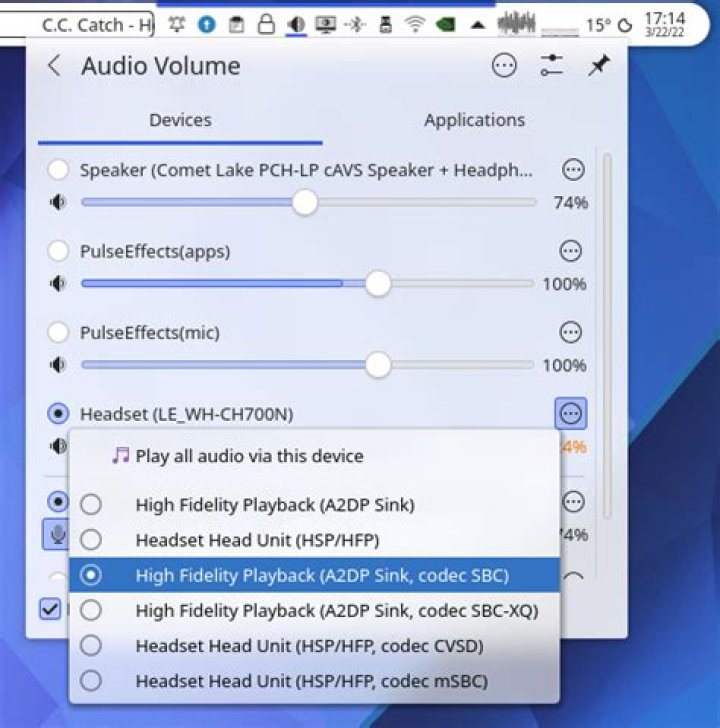
/etc/pulse/default.paconfiguration file:### Added to make headset work for pipewire ### load-module module-bluez5-device load-module module-bluez5-discoverOn my plasma desktop all codecs are now available:
Keeping default pulseaudio-module
In case you use the default pulseaudio setup from ubuntu simple uninstall or disable
pipwiree.g.:sudo apt-get remove pipewire*
More information about the a2dp problem can be found on BluetoothUser/a2dp - Debian Wiki.
BTW: My bluetooth hardware is implemented in the Intel Corporation Wi-Fi 6 AX201 chip which made it necessary to download (as on March 2022) the latest firmware driver from the linux kernel homepage. The firmware I am using is:
> ls -1 /lib/firmware/iwlwifi-QuZ-a0-hr-b0-*
/lib/firmware/iwlwifi-QuZ-a0-hr-b0-48.ucode
/lib/firmware/iwlwifi-QuZ-a0-hr-b0-50.ucode
/lib/firmware/iwlwifi-QuZ-a0-hr-b0-53.ucode
/lib/firmware/iwlwifi-QuZ-a0-hr-b0-55.ucode
/lib/firmware/iwlwifi-QuZ-a0-hr-b0-59.ucode
/lib/firmware/iwlwifi-QuZ-a0-hr-b0-62.ucode
/lib/firmware/iwlwifi-QuZ-a0-hr-b0-63.ucode
/lib/firmware/iwlwifi-QuZ-a0-hr-b0-65.ucode
/lib/firmware/iwlwifi-QuZ-a0-hr-b0-66.ucode
/lib/firmware/iwlwifi-QuZ-a0-hr-b0-67.ucode
/lib/firmware/iwlwifi-QuZ-a0-hr-b0-68.ucode
/lib/firmware/iwlwifi-QuZ-a0-hr-b0-71.ucode
Add something like that to /etc/pulse/default.pa
.ifexists module-bluetooth-discover.so
load-module module-bluetooth-discover
.endif
.ifexists module-switch-on-connect.so
load-module module-switch-on-connect
.endif
.ifexists module-bluez5-device.so
load-module module-bluez5-device
.endif
.ifexists module-bluez5-discover.so
load-module module-bluez5-discover
.endif
Restart bluetooth and pulseaudio services.
More in general

"Zoraya ter Beek, age 29, just died by assisted suicide in the Netherlands. She was physically healthy, but psychologically depressed. It's an abomination that an entire society would actively facilitate, even encourage, someone ending their own life because they had no hope. Th…"

