Change text color for OpenWeather Gnome Extension
Problem
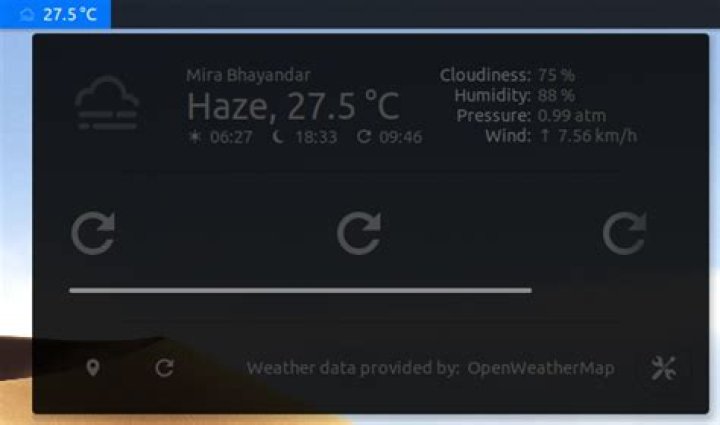
I installed the OpenWeather extension from OpenWeather - GNOME Shell Extensions. Everything is working fine except the text color(see image 1).
How do I change it to look like the calender (see image 2).
I have following extensions installed:
amey@ameypc:~$ ls ~/.local/share/gnome-shell/extensions/
@gmail.com
Additionally, I have set themes' in GNOME Tweaks tool as
Applications: MacOS-Dark-5.2-dark
Cursor : DMZ-White
Icons : Cupertino-Catalina
Shell : MacOS-Dark-5.2-dark
1 Answer
Give a solution that explains why this happened and how to resolve it? Feel free to comment for more details.
The colors are configured by the stylesheet.css file from the extensions directory.
$HOME/.local/share/gnome-shell/extensions/openweather-extension@the configuration is done by the extensions author.
If you wish to change the colors.. you need to dig the said stylesheet.css file.
as an Example.. I have edited some of the contents of the said stylesheet.css file.
Reference for Red and Green Colors:
Red & Green Colors.. Observe below content, I have separated forecast icon and current icon and gave red color.. remaining part added green color.
.openweather-current-summarybox,
.openweather-current-databox-captions,
.openweather-current-databox-values,
.openweather-forecast-summary,
.openweather-forecast-temperature{
color: green;
border-radius: 0px;
padding: 0px;
border: 0px;
}
.openweather-forecast-icon,
.openweather-current-icon {
color: red;
}
reference for Blue Color:
.openweather-forecast-day {
color: blue;
font-size: 90%;
spacing: 0;
}
reference for Magenta Color:
.openweather-current-databox-captions {
color: magenta;
text-align: right;
padding-right: 5px;
spacing: 0;
}
in the similar way you can configure any color from the stylesheet.css file.
When ever extension gets updated by author you may need to relook and do the necessary changes in the stylesheet.css file..


