Could not locate '\EFI\Boot\bootia32.efi': [14] Not Found
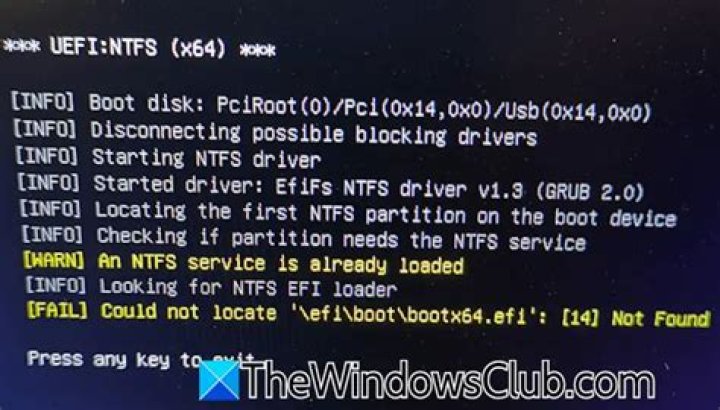
When I boot up Windows 10 IoT (64-bit) on one specific device, before booting, a black screen with the following message always pops up:
** UEFI:NTFS (ia32) **
[INFO] Boot disk: PciRoot(0)/Pci(0x1D,0x7)/Usb(0x4,0x0)
[INFO] Disconnecting possible blocking divers
[INFO] Starting NTFS driver
[INFO] Started driver: efifs NTFS driver v1.0 (GRUB 2.0)
[INFO] Locating the first NTFS partition on the boot device
[INFO] Checking if partition needs the NTFS service
[INFO] Starting NTFS partition service
[INFO] Looking for NTFS EFI Loader
[FAIL] Could not locate '\EFI\Boot\bootia32.efi': [14] Not Found
Press any key to exit.
After pressing any button, it will continue booting as it should and there are no further problems with the device. It will work as good as the other ones where this message appears.
What is causing this message to appear? And subsequently, how can I fix this? Since I'm talking about an IoT device, it is impossible that you should press a key for it to boot, there won't be any keyboard attached to it.
I provided a quick fix as an answer below, but I'm looking for an answer that doesn't involve changing the BIOS settings on every device.
Something that I find rather confusing is that it asks for bootia32.efi (which I'm guessing is for 32 bit) and not bootx64.efi.
14 Answers
I found a temporary solution by accident. If you go to your boot setup menu and change Configuration > Boot configuration > UEFI Boot to disabled, it won't show this screen again
Your boot is GPT changer it to MBR ( when you instal the iso file on the usb chose MBR ...not GPT) and you will boot from the usb ....then delete all the partions disques then create a new one (when you want to instal the windows... if the systeme said that the disque on your pc is type GPT ) so when you delete the partition and create new one the type change to MBR ... and problem solve 100%
Your friend from morocco
It sounds to me, like you copied a previous installation over to that device.
When windows is installed on a hard drive, it creates a partition on the hard drive called the EFI System Partition. This partition contains the /efi/.. folder you referenced. If that folder does NOT exist, then Windows needs to be booted using BIOS or the legacy bootloader, turning UEFI off in the boot menu, essentially forces your computer to use the legacy bootloader.
In short, when you copy a windows installation to a new machine, make sure to copy the EFI System Partition over with it. Or at least, re-install it with a tool like Windows Setup or GParted.
1just check your iso before booting just open(don't extract just open to browse through iso) iso using any extraction tool and go to and check is there a file named as bootx64.efi generally there is bootx32.efi when u get such error id there is bootx32.efi then download another copy of iso... in which there is bootx64.efi and your problem is solved.
1More in general

"Zoraya ter Beek, age 29, just died by assisted suicide in the Netherlands. She was physically healthy, but psychologically depressed. It's an abomination that an entire society would actively facilitate, even encourage, someone ending their own life because they had no hope. Th…"

