Did Outlook 365 move the search bar again? (This time, back to the message list header)
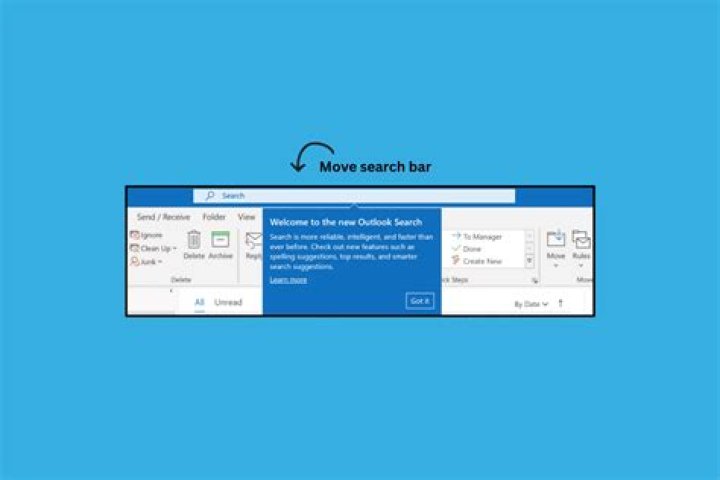
Outlook 365 appears to moved the search bar from the title bar back down into the application, this time full width across the message list.
Did this just happen, or am I hallucinating? I spent a solid minute today looking for the search bar in the title bar and making sure it wasn't hidden somehow.
This appeared in my corporate enterprise laptop instance of Office 365. My personally licensed Outlook 365 on a different machine still has the search bar in the title.
###Update 2021-03-03###
As requested in comments:
Corporate Version
Personal Version
Personal version is newer, which is surprise given then number of recent corporate updates. (That would indicate the corporate version was more out-of-date than I realized).
I have a near definite memory of the corporate search bar moved up to the title bar before moving back into the message list pane, but I have no way to prove it.
Updated 2021-03-10
Now I've been issued a brand new corporate laptop, with a year-newer version of Windows
Major Minor Build Revision
----- ----- ----- --------
10 0 18363 0
instead of
Major Minor Build Revision
----- ----- ----- --------
10 0 17763 0
The Office 365 I installed has a different version
and voila, the search back is back at the top. The mystery deepens. Apparently I was just tethered to an old version by an outdated desktop OS version. I considered uninstalling and reinstalling Office 365 on the old image, but I'm not really that curious.
Old machine just prompted me for an OS update application. When I do that, I'll post my findings again. (Old machine must be surrendered to company equipment depot by end of month). Stay tuned, if you've followed it this far. Look! Search back back up top:
2 Answers
I have Office 365 Subscription and Outlook with that. Version 2101 Build 13628.20448 just updated now.
Search Bar is still at the top and (still looking) no way to collapse it.
The search bar for Excel, Word, and all but One Note could be collapsed (still the search icon in the top bar). That (IMHO) is the best approach because users could have it collapsed or not to their own preference.
One Note Desktop appears to have changed. The search bar is now just an icon that opens when you click on it. Just like Excel, Word, .... I make this observation look at One Note Desktop on this machine and an (as yet) not update One Note Desktop on the machine next to this one.
So some change but not total. I expect Microsoft has listened to Business Users (your other computer) and has returned to a more traditional approach.
Outlook has not been (from a systems development standpoint) "part of the family" . Hopefully Microsoft will bring Outlook to heel.
In direct answer to your question, Outlook Subscription has not changed. I do not have the Corporate version here.
What's the version of your Outlook(File>Office account>About Outlook)?
According to my Outlook with enterprise license version 2101 in current channel and version 2012 in monthly channel, the search bar hasn't changed and it's still in the title bar, could you post a screenshot about your cleint version and the search bar in your Outlook?
More in general

"Zoraya ter Beek, age 29, just died by assisted suicide in the Netherlands. She was physically healthy, but psychologically depressed. It's an abomination that an entire society would actively facilitate, even encourage, someone ending their own life because they had no hope. Th…"

