Disable the default app key (super+num) functionality on Ubuntu 17.10 and later
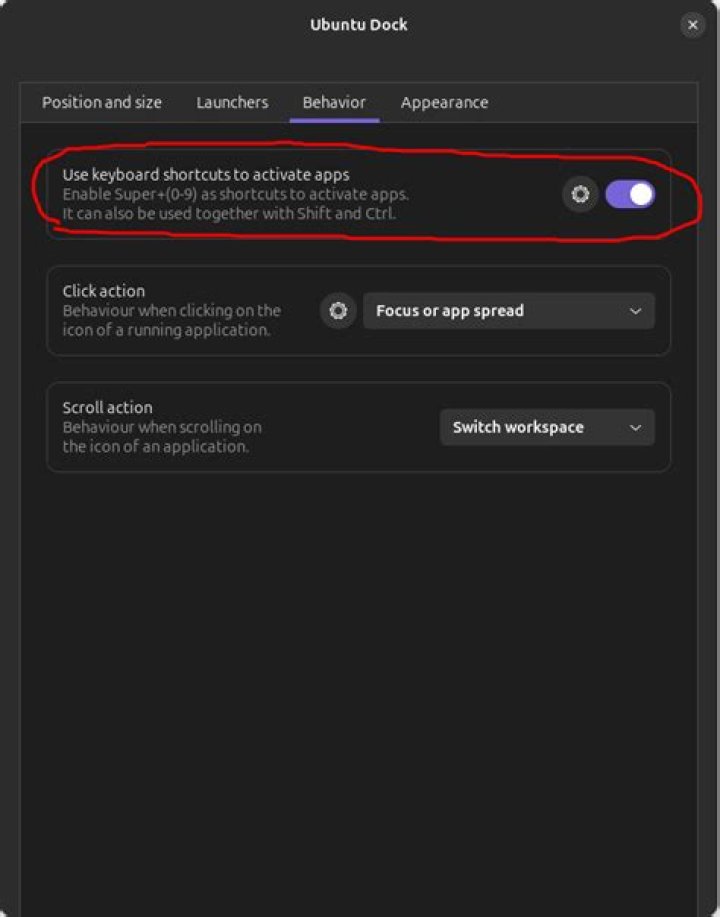
I like to switch workspaces via Super+Number. But unfortunately the default behavior in Ubuntu for Super+Number is to select applications from the dock.
Is it possible to disable that functionality? I've tried overriding the keyboard shortcuts but it doesn't appear to be working.
14 Answers
For Ubuntu 17.10 - 18.10
Run the following command in Terminal:
gsettings set org.gnome.shell.extensions.dash-to-dock hot-keys falseThis should disable the default behaviour of Super+0...9.
4For Ubuntu 19.04
In addition to Nolf's answer, you can also set these settings on the command line with these commands:
gsettings set org.gnome.shell.extensions.dash-to-dock hot-keys false
gsettings set org.gnome.shell.keybindings switch-to-application-1 []
gsettings set org.gnome.shell.keybindings switch-to-application-2 []
gsettings set org.gnome.shell.keybindings switch-to-application-3 []
gsettings set org.gnome.shell.keybindings switch-to-application-4 []
gsettings set org.gnome.shell.keybindings switch-to-application-5 []
gsettings set org.gnome.shell.keybindings switch-to-application-6 []
gsettings set org.gnome.shell.keybindings switch-to-application-7 []
gsettings set org.gnome.shell.keybindings switch-to-application-8 []
gsettings set org.gnome.shell.keybindings switch-to-application-9 []
Update:
I'm using Dash to Panel now (instead of Dash to Dock) and got the same problem back again. Now we need these commands:
dconf write /org/gnome/shell/extensions/dash-to-panel/hot-keys false
dconf write /org/gnome/shell/extensions/dash-to-panel/hotkey-prefix-text "''"
dconf write /org/gnome/shell/extensions/dash-to-panel/app-hotkey-1 "['']"
dconf write /org/gnome/shell/extensions/dash-to-panel/app-hotkey-2 "['']"
dconf write /org/gnome/shell/extensions/dash-to-panel/app-hotkey-3 "['']"
dconf write /org/gnome/shell/extensions/dash-to-panel/app-hotkey-4 "['']"
dconf write /org/gnome/shell/extensions/dash-to-panel/app-hotkey-5 "['']"
dconf write /org/gnome/shell/extensions/dash-to-panel/app-hotkey-6 "['']"
dconf write /org/gnome/shell/extensions/dash-to-panel/app-hotkey-7 "['']"
dconf write /org/gnome/shell/extensions/dash-to-panel/app-hotkey-8 "['']"
dconf write /org/gnome/shell/extensions/dash-to-panel/app-hotkey-9 "['']"
dconf write /org/gnome/shell/extensions/dash-to-panel/app-hotkey-10 "['']"
dconf write /org/gnome/shell/extensions/dash-to-panel/app-hotkey-kp-1 "['']"
dconf write /org/gnome/shell/extensions/dash-to-panel/app-hotkey-kp-2 "['']"
dconf write /org/gnome/shell/extensions/dash-to-panel/app-hotkey-kp-3 "['']"
dconf write /org/gnome/shell/extensions/dash-to-panel/app-hotkey-kp-4 "['']"
dconf write /org/gnome/shell/extensions/dash-to-panel/app-hotkey-kp-5 "['']"
dconf write /org/gnome/shell/extensions/dash-to-panel/app-hotkey-kp-6 "['']"
dconf write /org/gnome/shell/extensions/dash-to-panel/app-hotkey-kp-7 "['']"
dconf write /org/gnome/shell/extensions/dash-to-panel/app-hotkey-kp-8 "['']"
dconf write /org/gnome/shell/extensions/dash-to-panel/app-hotkey-kp-9 "['']"
dconf write /org/gnome/shell/extensions/dash-to-panel/app-hotkey-kp-10 "['']"
dconf write /org/gnome/shell/extensions/dash-to-panel/app-ctrl-hotkey-1 "['']"
dconf write /org/gnome/shell/extensions/dash-to-panel/app-ctrl-hotkey-2 "['']"
dconf write /org/gnome/shell/extensions/dash-to-panel/app-ctrl-hotkey-3 "['']"
dconf write /org/gnome/shell/extensions/dash-to-panel/app-ctrl-hotkey-4 "['']"
dconf write /org/gnome/shell/extensions/dash-to-panel/app-ctrl-hotkey-5 "['']"
dconf write /org/gnome/shell/extensions/dash-to-panel/app-ctrl-hotkey-6 "['']"
dconf write /org/gnome/shell/extensions/dash-to-panel/app-ctrl-hotkey-7 "['']"
dconf write /org/gnome/shell/extensions/dash-to-panel/app-ctrl-hotkey-8 "['']"
dconf write /org/gnome/shell/extensions/dash-to-panel/app-ctrl-hotkey-9 "['']"
dconf write /org/gnome/shell/extensions/dash-to-panel/app-ctrl-hotkey-10 "['']"
dconf write /org/gnome/shell/extensions/dash-to-panel/app-ctrl-hotkey-kp-1 "['']"
dconf write /org/gnome/shell/extensions/dash-to-panel/app-ctrl-hotkey-kp-2 "['']"
dconf write /org/gnome/shell/extensions/dash-to-panel/app-ctrl-hotkey-kp-3 "['']"
dconf write /org/gnome/shell/extensions/dash-to-panel/app-ctrl-hotkey-kp-4 "['']"
dconf write /org/gnome/shell/extensions/dash-to-panel/app-ctrl-hotkey-kp-5 "['']"
dconf write /org/gnome/shell/extensions/dash-to-panel/app-ctrl-hotkey-kp-6 "['']"
dconf write /org/gnome/shell/extensions/dash-to-panel/app-ctrl-hotkey-kp-7 "['']"
dconf write /org/gnome/shell/extensions/dash-to-panel/app-ctrl-hotkey-kp-8 "['']"
dconf write /org/gnome/shell/extensions/dash-to-panel/app-ctrl-hotkey-kp-9 "['']"
dconf write /org/gnome/shell/extensions/dash-to-panel/app-ctrl-hotkey-kp-10 "['']"
dconf write /org/gnome/shell/extensions/dash-to-panel/app-shift-hotkey-1 "['']"
dconf write /org/gnome/shell/extensions/dash-to-panel/app-shift-hotkey-2 "['']"
dconf write /org/gnome/shell/extensions/dash-to-panel/app-shift-hotkey-3 "['']"
dconf write /org/gnome/shell/extensions/dash-to-panel/app-shift-hotkey-4 "['']"
dconf write /org/gnome/shell/extensions/dash-to-panel/app-shift-hotkey-5 "['']"
dconf write /org/gnome/shell/extensions/dash-to-panel/app-shift-hotkey-6 "['']"
dconf write /org/gnome/shell/extensions/dash-to-panel/app-shift-hotkey-7 "['']"
dconf write /org/gnome/shell/extensions/dash-to-panel/app-shift-hotkey-8 "['']"
dconf write /org/gnome/shell/extensions/dash-to-panel/app-shift-hotkey-9 "['']"
dconf write /org/gnome/shell/extensions/dash-to-panel/app-shift-hotkey-10 "['']"
dconf write /org/gnome/shell/extensions/dash-to-panel/app-shift-hotkey-kp-1 "['']"
dconf write /org/gnome/shell/extensions/dash-to-panel/app-shift-hotkey-kp-2 "['']"
dconf write /org/gnome/shell/extensions/dash-to-panel/app-shift-hotkey-kp-3 "['']"
dconf write /org/gnome/shell/extensions/dash-to-panel/app-shift-hotkey-kp-4 "['']"
dconf write /org/gnome/shell/extensions/dash-to-panel/app-shift-hotkey-kp-5 "['']"
dconf write /org/gnome/shell/extensions/dash-to-panel/app-shift-hotkey-kp-6 "['']"
dconf write /org/gnome/shell/extensions/dash-to-panel/app-shift-hotkey-kp-7 "['']"
dconf write /org/gnome/shell/extensions/dash-to-panel/app-shift-hotkey-kp-8 "['']"
dconf write /org/gnome/shell/extensions/dash-to-panel/app-shift-hotkey-kp-9 "['']"
dconf write /org/gnome/shell/extensions/dash-to-panel/app-shift-hotkey-kp-10 "['']"
And then turn off and on the extension should make it work.
2For Ubuntu 19.04
Install dconf-editor (sudo apt install dconf-editor) and open dconf-editor. Replace the keyboard shortcuts with empty brackets '[]' as shown in the screenshot.
In my experience on Ubuntu 19.04 I have to set both
org.gnome.shell.extensions.dash-to-dock app-hotkey-1 '[]'
org.gnome.shell.keybindings switch-to-application-1 '[]'
in order to deactivate the app launcher shortcut 1. If I change only one of the two settings it does not work.
1

