Disk is likely to fail soon (37° C / 99° F)
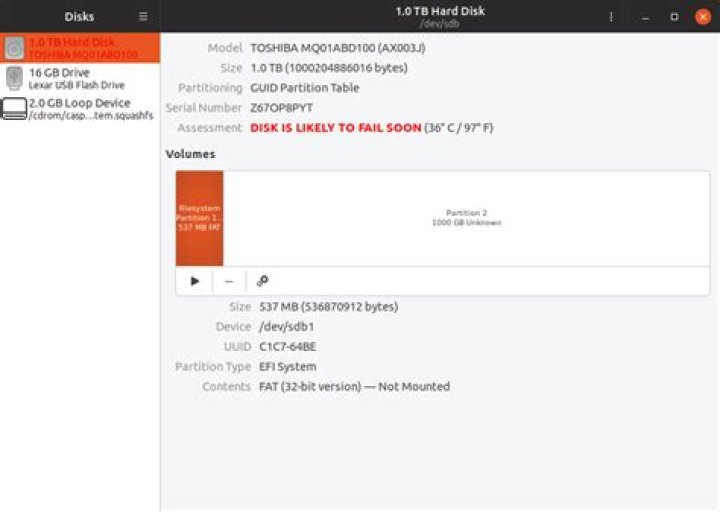
Almost a fresh install of Ubuntu 3 days old. I never had a single problem with running Windows 10 on this laptop for the last 3 years. I don't know what happened.
What should I do to diagnose this?
I am completely new at using a Linux-based OS. I have been using Windows for years. Now I mainly switched to Linux on my laptop for privacy issues, evading data collecting the most I can. I use a computer for video edition, webmastering and social medias. I have a chef brand.
When I want to import my data from a USB external HDD and/or SD card reader I get a Read error on swap-device error.
I don't really want to go back on Windows for explanation on top, but since I don't know commands and coding I need a little help here.
~$ free -h:
 total used free shared buff/cache available
Mem: 7.6Gi 4.4Gi 274Mi 801Mi 2.9Gi 2.1Gi
Swap: 2.0Gi 118Mi 1.9Gi
~$ grep -i swap /etc/fstab:
/swapfile none swap sw 0 0~$ sudo blkid:
 asdasd/dev/sda2: UUID="04df9e3d-3c3c-4a1b-8177-961c7fa8dc41" TYPE="ext4" PARTUUID="0e9d6cbf-f602-4f5f-a6ff-cbf6a3f1cb47"
/dev/loop0: TYPE="squashfs"
/dev/loop1: TYPE="squashfs"
/dev/loop2: TYPE="squashfs"
/dev/loop3: TYPE="squashfs"
/dev/loop4: TYPE="squashfs"
/dev/loop5: TYPE="squashfs"
/dev/loop6: TYPE="squashfs"
/dev/loop7: TYPE="squashfs"
/dev/sda1: UUID="06C2-BFC1" TYPE="vfat" PARTLABEL="EFI System Partition" PARTUUID="8063f3cf-da82-4d74-81d1-1fbc716caef1"
/dev/loop8: TYPE="squashfs"
/dev/loop9: TYPE="squashfs"
/dev/loop10: TYPE="squashfs"
/dev/loop11: TYPE="squashfs"
/dev/loop12: TYPE="squashfs"
/dev/loop13: TYPE="squashfs"
/dev/loop14: TYPE="squashfs"
/dev/loop15: TYPE="squashfs"
/dev/loop16: TYPE="squashfs"
/dev/loop17: TYPE="squashfs"
/dev/loop18: TYPE="squashfs"
/dev/loop19: TYPE="squashfs"
/dev/loop20: TYPE="squashfs"
/dev/loop21: TYPE="squashfs"
Added picture:
1 Answer
Those SMART errors mean that disk failure is imminent. You will need to replace the disk soon.
If you don't have sufficient backups, make them now before it's too late.
2

