How can I make ascii-banners from the command line?
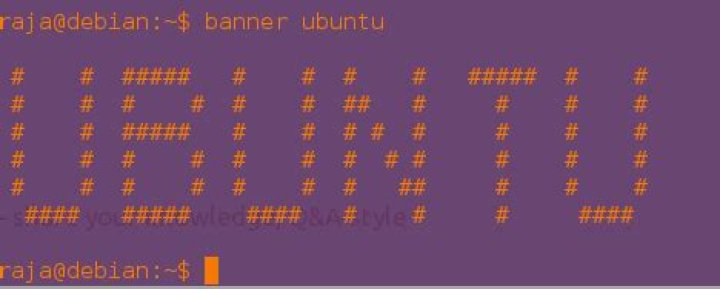
I've seen people using the terminal command: banner. This creates big ascii-art-style text.
When I try to run it, however, the terminal says it doesn't exist. Why?
How do I install it? Are there any alternatives?
07 Answers
I've always preferred figlet for big writing. Something about it preserves the character shape better. A bit subjective but there you go. Simple enough:
$ sudo apt-get install figlet
$ figlet oh hai! _ _ _ _ ___ | |__ | |__ __ _(_) | / _ \| '_ \ | '_ \ / _` | | |
| (_) | | | | | | | | (_| | |_| \___/|_| |_| |_| |_|\__,_|_(_)
(It looks better in a terminal than it does here)
There are a ton of formatting options too that make it suitable for lots of different situations. It does this through "fonts" (standard, slant, shadow, small, smslant, bubble, digital, mini, etc). man figlet has a full listing of available styles and formatting options but here are a few examples:
$ figlet -f slant Hooah! __ __ __ __ / / / /___ ____ ____ _/ /_ / / / /_/ / __ \/ __ \/ __ `/ __ \/ / / __ / /_/ / /_/ / /_/ / / / /_/
/_/ /_/\____/\____/\__,_/_/ /_(_)
$ figlet -f smslant Hooah! __ __ __ __ / // /__ ___ ___ _/ / / / / _ / _ \/ _ \/ _ `/ _ \/_/
/_//_/\___/\___/\_,_/_//_(_)
$ figlet -f bubble Hooah! _ _ _ _ _ _ / \ / \ / \ / \ / \ / \
( H | o | o | a | h | ! ) \_/ \_/ \_/ \_/ \_/ \_/
$ figlet -f mini Hooah!
|_| _ _ _.|_ |
| |(_)(_)(_|| |o You need to install it before you can use it. Type in the terminal:
sudo apt-get install sysvbanner
This Package is not available in the standard installation and for this is why you have to install it manually.
If you wish to use other "fonts" / ASCII art for a banner, you could also look at figlet:
sudo apt-get install figlet
foo@bar:~$ figlet
hi _ _
| |__ (_)
| '_ \| |
| | | | |
|_| |_|_|
cheers
sc.
4Found one more named as toilet.
sudo apt-get install toiletThen run
toilet -f bigmono9 -F gay <your string>For Example:
Alternative (without installing anything)
- Go to
- In search bar type:
figlet YOUR BANNER HERE - Copy the figlet and use it in the Bash script
Example Bash code:
#!/bin/bash
printf " YOUR FIGLET BANNER HERE
"Open your terminal and paste as
sudo apt-get install sysvbannerUsage:
banner <yourstring>Example:
Another (longer) option that might be helpful if there's any nodejs involvement is ascii-banner. It's a node library but it can be scripted out.
$ sudo apt-get install npm
$ sudo npm -g install ascii-banner
$ node -e "var AsciiBanner = require('ascii-banner');AsciiBanner.write('Oh hai').out();" ______ __ __ __ __ ___ __ / __ \ | | | | | | | | / \ | |
| | | | | |__| | | |__| | / ^ \ | |
| | | | | __ | | __ | / /_\ \ | |
| `--' | | | | | | | | | / _____ \ | | \______/ |__| |__| |__| |__| /__/ \__\ |__|
It also has font options:
$ node -e "require('ascii-banner').write('Oh hai').font('Thin').out();"
,---.| | o
| ||---. |---.,---..
| || | | |,---||
`---'` ' ` '`---^`More in general

"Zoraya ter Beek, age 29, just died by assisted suicide in the Netherlands. She was physically healthy, but psychologically depressed. It's an abomination that an entire society would actively facilitate, even encourage, someone ending their own life because they had no hope. Th…"

