How do I change the display name (or create script) of MSI App in Appwiz.cpl
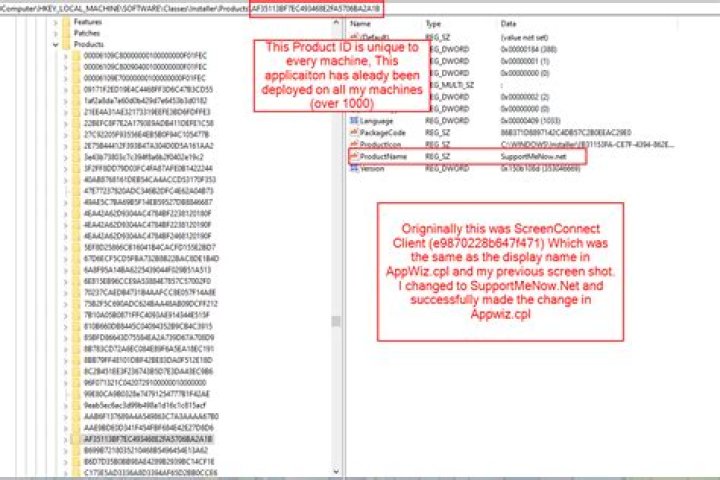
Objective, How to create a script/command to change the unique product name of an application to display differently in appwiz.cpl Computer\HKEY_LOCAL_MACHINE\SOFTWARE\Classes\Installer\Products* I want it too display as SupportMeNow.net
ScreenConnect Client (e9870228b647f471)
This is what appears by default in appwiz. ScreenConnect Client (e9870228b647f471)
This is where I found the MSI uninstall String. I attempted to change "Display Name" to SupportMeNow.net and it still showed as ScreenConnect Client (e9870228b647f471) in appwiz.cpl,
Then I decided to change at the product ID.
I changed Product Name = Supportmenow.net and it successfully changed in Appwiz.cpl
So my question is, How can I create a script/export and deploy it to all my machines to change the Product Name on all my machines, I have end point management and can push any command/powershell script. I just need to know how I can set a variable to detect the unique product ID to change Product Name. I hope this makes sense, If not feel free to respond to me and I will do my best to clarify.
1 Answer
Use thereg add command.
Something like:
REG ADD HKEY_LOCAL_MACHINE\SOFTWARE\Classes\Installer\Products\AF35113BF7EC493468E2FA5706BA2A1B /v ProductName /d "SupportMeNow.net"

