How do I get a specific MS Edge icon for MS Edge link on Desktop or Quick Launch bar?
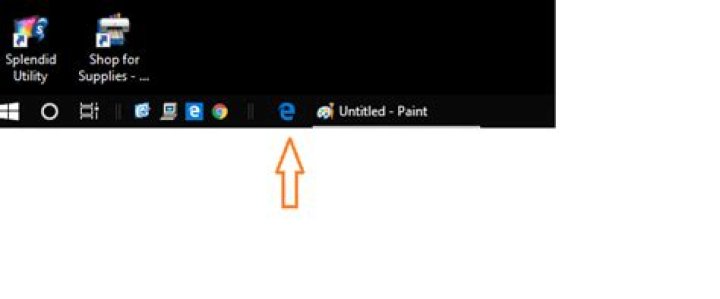
I have Windows 10 Home 64 bit v1803 on my Asus laptop. I have enabled the old XP style classic Quick Launch bar on the taskbar. I have added a few items to it as you can see in the below screenshot including Microsoft Edge.
I dragged MS Edge link from the desktop to Quick launch bar to add it there as a shortcut or a link.
I however did not like the Microsoft Edge icon on the desktop & quick launch. Blue square with white small 'e' in it. However when I pin Edge to the taskbar, I get a nice icon. Black background with blue 'e' in it.
I am unable to get that icon on this MS Edge shortcut on Quick Launch bar.
Right clicking on pinned Edge link does not offer any options. Also Microsoftedge.exe at C:\Windows\WinSxS... has same blue square with white e icon in it.
I can right click on the Quick Launch link and specify 'Change Icon' but I have no clue where to find that blue 'e' Edge icon.
Where is this blue 'e' Edge icon in Windows 10 and how to get it set for MS Edge link on the quick launch bar?
1 Answer
It looks like Win10 UWP apps can use the png format for icons.
There are a lot of PNG pictures here: C:\Windows\SystemApps\Microsoft.MicrosoftEdge_8wekyb3d8bbwe\Assets
You can to convert the png to an ico. There are websites that do it freely, like:
- Choose the file to convert. Paste the location above and find the icon you want.
- Click Upload
- Click Convert ICO
- Download the new icon file. Note the location for future use.
- Select the new icon under the properties for the quick launch icon.
I used the 44x44 icon and it seems to work well.
(MicrosoftEdgeSquare44x44.targetsize-30_altform-unplated.png)


