How do I get add-apt-repository to work through a proxy?
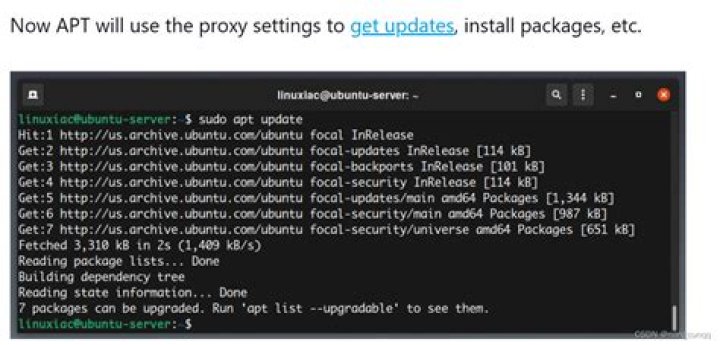
I'm trying to follow the "Installing Cross Toolchain on Ubuntu 10.04 (Lucid) and 10.10 (Maverick) Hosts" instructions on wiki.linaro.org (on my Ubuntu 10.04 VM). The first step is:
sudo add-apt-repository ppa:linaro-maintainers/toolchainBut when I run that I get:
Error reading <urlopen error [Errno 110] Connection timed out>I'm guessing the problem is with my configuration for my employer's proxy server, particularly for HTTPS.
When I opened in Firefox, I got "The connection has timed out". I then went into Firefox Preferences -> Advanced -> Network -> Settings... and set HTTP Proxy to "gateway" and Port to 8080, and checked "Use this proxy server for all protocols". Then the page loaded. This supports my theory.
I've tried setting the http_proxy and https_proxy environment variables (both lower and upper case):
$ set | grep -i proxy
HTTPS_PROXY=
HTTP_PROXY=
http_proxy=
https_proxy=
I also tried changing them to:
$ set | grep -i proxy
HTTPS_PROXY=gateway:8080
HTTP_PROXY=gateway:8080
http_proxy=gateway:8080
https_proxy=gateway:8080
And I tried adding this second line to /etc/apt/apt.conf:
Acquire::http::proxy "";
Acquire::https::proxy "";
But I continue to get the same error.
How do I troubleshoot this?
Update: I followed the instructions in the accepted answer to "Problem adding repositories and connecting from terminal behind a proxy" and got further:
$ sudo add-apt-repository ppa:linaro-maintainers/toolchain
Executing: gpg --ignore-time-conflict --no-options --no-default-keyring --secret-keyring /etc/apt/secring.gpg --trustdb-name /etc/apt/trustdb.gpg --keyring /etc/apt/trusted.gpg --primary-keyring /etc/apt/trusted.gpg --keyserver keyserver.ubuntu.com --recv 1DD749B890A6F66D050D985CF1FCBACA7BE1F97B
gpg: requesting key 7BE1F97B from hkp server keyserver.ubuntu.com
gpgkeys: HTTP fetch error 7: couldn't connect to host
gpg: no valid OpenPGP data found.
gpg: Total number processed: 0
I wonder if the "HTTP fetch error" means I also need to add "Defaults env_keep = http_proxy" to /etc/sudoers...
Update #2: I added:
Defaults env_keep="http_proxy"
Defaults env_keep="https_proxy"
...as in Comment 18 for bug 516032, but I still get the same "gpgkeys: HTTP fetch error 7: couldn't connect to host" error.
And this is curious:
$ sudo env | grep proxy
https_proxy=
...because http_proxy isn't there.
Any advice is appreciated.
Update #3: Since the host of my VM is a laptop, I took it home and tried there (with no proxies):
$ sudo add-apt-repository ppa:linaro-maintainers/toolchain
Executing: gpg --ignore-time-conflict --no-options --no-default-keyring --secret-keyring /etc/apt/secring.gpg --trustdb-name /etc/apt/trustdb.gpg --keyring /etc/apt/trusted.gpg --primary-keyring /etc/apt/trusted.gpg --keyserver keyserver.ubuntu.com --recv 1DD749B890A6F66D050D985CF1FCBACA7BE1F97B
gpg: requesting key 7BE1F97B from hkp server keyserver.ubuntu.com
gpg: key 7BE1F97B: public key "Launchpad Linaro Overlay PPA" imported
gpg: Total number processed: 1
gpg: imported: 1 (RSA: 1)
It worked. So problem is related to proxy configuration. But I suppose I have a workaround.
116 Answers
In addition to configuring proxies, tell sudo to preserve the environment with the -E option:
export http_proxy=
export https_proxy=
sudo -E add-apt-repository ppa:linaro-maintainers/toolchain
with username and password:
export https_proxy=Use the following code in a terminal to add gpg key behind proxy,
sudo apt-key adv --keyserver-options http-proxy= --keyserver keyserver.ubuntu.com --recv-keys GPG_KEYAnd replace uppercase letters accordingly. If you are using a proxy without any user authentication (i.e., user name and password) use http-proxy= instead.
For example to have GPG_KEY=C2514567EEA14886 you can use,
sudo apt-key adv --keyserver-options http-proxy= --keyserver keyserver.ubuntu.com --recv-keys C2514567EEA14886where,
USER_ID=user
PASSWORD=abc123
PROXY_URL=10.10.2.21
PORT=3128
If you don't have user authentication simply use,
sudo apt-key adv --keyserver-options http-proxy= --keyserver keyserver.ubuntu.com --recv-keys C2514567EEA14886Finally! You need to set https_proxy via:
export https_proxy=....only set http_proxy is not enough.
And I needed to execute the add-apt-repository command as root, NOT via sudo.
Code:
sudo su
add-apt-repository ppa:........It seems that the proxy configuration is set up but somehow the server cannot be contacted...
I had a very similar issue which I resolved like this: The corporate proxy allows only port 80 and 443 for security reasons, so event when it is setup, since HKP protocol is using port 11371, it will not let you through.
So, short of SSH-ing out and getting the key from one of your servers outside, downloading it and installing it locally, you can specify the key server from on of the ones listed below and specify the port:
e.g.:
apt-key adv --keyserver hkp://p80.pool.sks-keyservers.net:80 --recv-keys XXXXXBoom, Voila!
1The reason your sudoers change did not work as expected is that instead of:
Defaults env_keep="http_proxy" Defaults env_keep="https_proxy"You should have written:
Defaults env_keep+="http_proxy" Defaults env_keep+="https_proxy"Also make sure the space between Defaults and env_keep is a tab each time.
I managed to workaround this by editing /usr/lib/python3/dist-packages/softwareproperties/ppa.py and adding
"--keyserver-options", "http-proxy=<proxy_url>",under the following line
"--keyserver", self.keyserver,More background information
ppa.py is the python script that is used by add-apt-repository to call gpg. There sometimes seem to be a bug with gpg where it does not use the http_proxy environment variable. This can be confirmed by viewing the file /root/.gnupg/dirmngr.conf and checking to see that honor-http-proxy is not commented out.
This four step approach worked for me on an Ubuntu 17.04 VM behind a corporate proxy.
sudo apt-add-repository ppa:brightbox/ruby-ngand let it failsudo apt updateand look for an error message likeThe following signatures couldn't be verified because the public key is not available: NO_PUBKEY F5DA5F09C3173AA6sudo apt-key adv --keyserver-options http-proxy= --keyserver hkp://keyserver.ubuntu.com:80 --recv-keys F5DA5F09C3173AA6sudo apt updatewill now work
Note that the host VM is running a CNTLM proxy server on port 3128.
This helped me:
sudo https_proxy=' \
http_proxy=' \
ftp_proxy='ftp://user:password@proxyhost:port/' \
no_proxy=localhost,127.0.0.0/8,10.0.0.0/8 add-apt-repository ppa:webupd8team/java
I guess that there are some environment variables which are not needed in the command but they do not harm.
What I do is use http via curl instead of trying to proxy apt-key or gpg:
curl -sSL \ '' \ | sudo apt-key add -
This method should be used instead of the apt-key command line or http_proxy or https_proxy environment variables settings (which are disabled in the newest versions of apt-key).
Add the PPA manually to your /etc/apt/sources.list:
deb trusty mainSave the file and run sudo apt-get update. This error might pop up:
W: GPG error: trusty InRelease: The following signatures couldn't be verified because the public key is not available: NO_PUBKEY 5BB92C09DB82666CRun the following command to accept the key for the PPA, remembering to change the key (5BB92C09DB82666C) for corresponding PPA.
sudo apt-key adv --keyserver hkp://keyserver.ubuntu.com:80 --recv-keys 5BB92C09DB82666CRun sudo apt-get update and you're done.
Ref: How To Add Launchpad PPAs In Debian Via add-apt-repository Command
Actually, I run into the same problems, that's how I found this page.
environment variables http_proxy (case sensitive) and https_proxy (whatever case) do something. Not setting them fails in the first stage, setting the environment variables do seem to have some effect; it will fail if you don't export them
TCRKVMW ~ $ sudo su -
TCRKVMW ~ # export http_proxy=
TCRKVMW ~ # export https_proxy=
TCRKVMW ~ # add-apt-repository ppa:webupd8team/java
You are about to add the following PPA: Oracle Java (JDK) Installer (automatically downloads and installs Oracle JDK7 / JDK8 / JDK9). There are no actual Java files in this PPA.
(the rest is successful - this time)
The thing is, sometimes, it just get stuck and ends with the usual timeout message: Cannot add PPA: '"Error reading : (7, 'Failed to connect to launchpad.net port 443: Connection timed out')"'.
...but I'm cheating, I'm doing all this as root. An easy solution is to edit /etc/profile or, on Ubuntu/Mint, just add a script in /etc/profile.d:
TCRKVMW ~ $ sudo su -c 'F=/etc/profile.d/proxy.sh S="export proxy_http=\""\nexport proxy_https=\""" ; echo -e ${S} > ${F} ; chmod 700 ${F}'Oh, yeah, there's also that thing about curl (which is used by apt-add-repository, by the way). The manual says to add .curlrc in your home directory. Because apt-add-directory is root's own, it means adding it to /root/.curlrc:
proxy_http="" proxy_https=""A good idea is to do the same in your own ~/.curlrc
Also, enabling the proxy in /etc/wgetrc is a good thing to do, although it has nothing to do with the question asked, I'm just saving you another search on Google (if you read this, you have multiple with a proxy)...
In /etc/apt/apt.conf.d/01proxy add something like this
Acquire::http { Proxy ""; };This will proxy all aptitude downloads, but I think this is the only way to do this on the backend. If your proxy supports it, you can also use a url like which I know works for apt-cache-ng
I'm not sure if add-apt-repository itsself uses these settings, but if you cannot make that work, you can always add the repository to your /etc/apt/sources.list or /etc/apt/sources.list.d/*mytoolchain*
Since 11.10 there is also a cross-toolchailable in the main repo, just apt-get install gcc-arm-linux-gnueabihf. There are also cross-toolchains available from emdebian, and some instructions here:
Execute the below command in terminal
export http_proxy=
export ftp_proxy=
System wide environment variables should really be added to /etc/environment (use sudo or gksu), but the error reported to you seems to state no gpg data was found. Ideas:
- check the proxy settings (if you have access)
- check if the proxy is somehow munging the output of encrypted traffic.
- run a continuous netstat to see if the connection to the proxy is in fact being made
- last resort would be to tcpdump & inspect in wireshark
- try a http tunnel ;)
Another solution is to add a APT proxy.conf file, /etc/apt/apt.conf.d/proxy.conf
Acquire::http::Proxy "";
Acquire::https::Proxy "";
Yet another potential solution:
The proxy settings in all the above solutions all point to some underlying connectivity problems. In my case, I'm executing the command on my laptop which is connected through my home internet provider. Although my internet provider doesn't require me to set http(s)_proxy, I figured that my internet provider may have some settings on their end that somehow (unintentionally) blocked the connection for this command.
I turned on a personal client VPN on my laptop. That got around whatever connection restrictions my home internet provider may have had. It worked!
So, if you have either a personal or work VPN for your laptop (and you're executing the command on your laptop), try it.
More in general

"Zoraya ter Beek, age 29, just died by assisted suicide in the Netherlands. She was physically healthy, but psychologically depressed. It's an abomination that an entire society would actively facilitate, even encourage, someone ending their own life because they had no hope. Th…"

