How does email routing work?
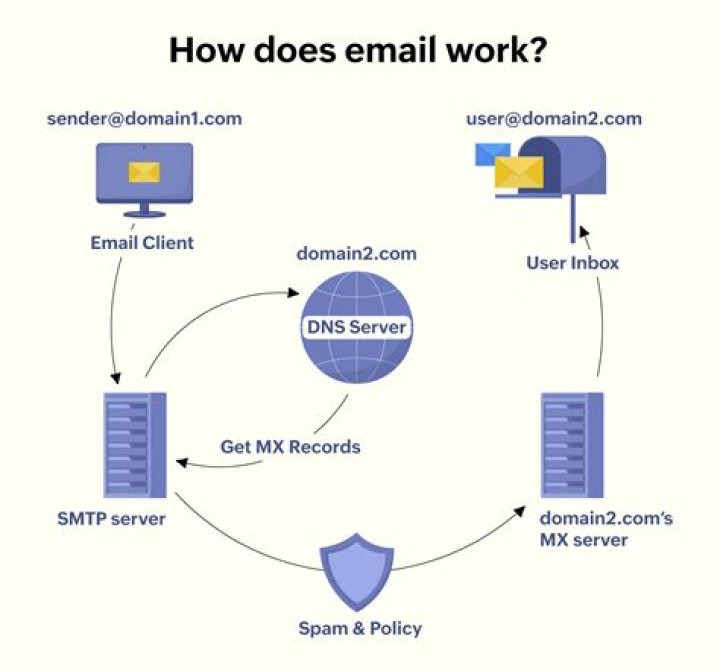
I want to understand how email routing works. Lets say I am trying to send a message to someone @gmail.com. According to my current understanding, the following steps happen:
- DNS MX query on gmail.com.
- Pick a mail exchange server with highest priority (lowest number) value.
- Send mail to exchange server on port 25 (smtp).
But when I did a port scan (using nmap) on port 25, I found that port 25 is closed for mail exchange server of domain gmail.com (gmail-smtp-in.l.google.com). This is the case with most of the email domains. Please help in understanding the flow of email routing.
41 Answer
What you're missing is that nmap isn't the be-all-end-all checker of open ports.
For one, it's a terrible idea to do a full-on port scan just to see if one single port is open. telnet works perfectly fine:
shadur@huginn:~$ telnet gmail-smtp-in.l.google.com. 25
Trying 2a00:1450:4013:c01::1b...
Connected to gmail-smtp-in.l.google.com.
Escape character is '^]'.
Mark makes one very good possible explanation in the comment to your question; another possibility is that google's mail server, which almost certainly is under near-constant low-grade attacks from opportunists, notices the port scan attempt and promptly blocks your IP address for the next five minutes before you've gotten as far as port 22, let alone 25.
That said, the full flow diagram is a little larger:
- You compose the message in your mail client, whatever it may be (called a Mail User Agent, or MUA).
- The MUA consults its settings and the To: field to see how this should be handled, then calls on the appropriate outgoing mail server (MTA - Mail Transfer Agent) that its configuration tells it has been tasked to handle this. On unix systems, this is normally
localhost; windows systems tend to configure their ISP's outgoing mail server. - The MTA that receives the message from the MUA checks its configuration and matches it against the message's source, destination (and optionally body) to decide what should be done with it. Depending on the aforementioned this can vary from rejecting it outright to scanning it for viruses/spam/etc or sending it on.
- If the MTA determines that the message should be accepted, but the recipient's domain is not in its list of domains to be handled locally, it will attempt to relay the message, either to the recipient domain's MX or a configured so-called "smart host". (Most unix systems mentioned in #3 have their localhost smtp server configured to use their ISP's mail server for outgoing mail). The "smart host" will then pick this up at step 3.
- Once an MTA in the link has decided to send it directly to the recipient, it will first attempt to send it to the primary MX. If that MX doesn't respond, it'll attempt the rest of the MX servers in order of descending priority until it gets an explicit accept or reject response from one or until it runs out of MX records to try, whichever comes first.
- Once an MTA in the recipient domain's MX records receives the message, it will likewise consult its configuration and match it against the message headers and contents to determine what to do with it, with the same repertoire of options as mentioned under #3, but with the added option to "deliver to end user" via the configured Mail Delivery Agent (MDA).
- When the MDA receives the message, it too consults its configuration to decide how the message should be handled and what mailbox (if any) the message should be dropped into.


