How to kill firefox from command line
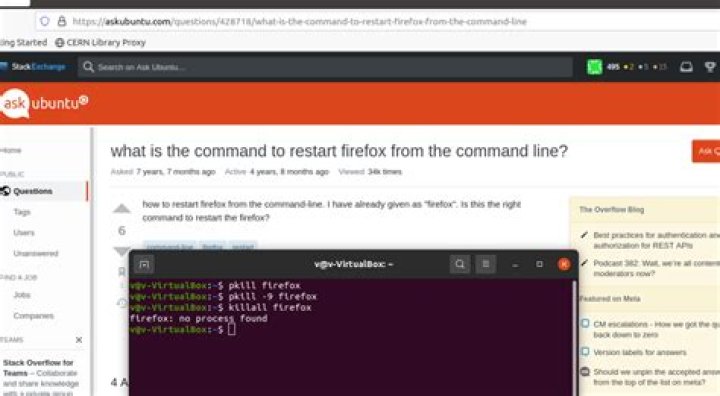
How to kill firefox from the command line?
I have tried:
pkill firefox # the command was known to work previously
pkill -9 firefox
kill -9 firefox # descibed in
bash: kill: firefox: arguments must be process or job IDs
killall firefox #described in
All in vain.
The output of
ps aux | grep -i firefox | grep -v grepis
v 2419 1.7 7.7 4026824 458876 ? Sl 12:56 0:51 /usr/lib/firefox/firefox -new-window
v 2483 0.0 0.6 190540 38684 ? Sl 12:56 0:00 /usr/lib/firefox/firefox -contentproc -parentBuildID 20210927210923 -prefsLen 1 -prefMapSize 246254 -appdir /usr/lib/firefox/browser 2419 true socket
v 2515 0.0 2.0 2407620 119704 ? Sl 12:56 0:01 /usr/lib/firefox/firefox -contentproc -childID 1 -isForBrowser -prefsLen 102 -prefMapSize 246254 -jsInit 286204 -parentBuildID 20210927210923 -appdir /usr/lib/firefox/browser 2419 true tab
v 2553 0.5 2.6 2572708 156816 ? Sl 12:56 0:16 /usr/lib/firefox/firefox -contentproc -childID 2 -isForBrowser -prefsLen 268 -prefMapSize 246254 -jsInit 286204 -parentBuildID 20210927210923 -appdir /usr/lib/firefox/browser 2419 true tab
v 2581 0.0 1.6 2406928 99740 ? Sl 12:56 0:01 /usr/lib/firefox/firefox -contentproc -childID 3 -isForBrowser -prefsLen 4889 -prefMapSize 246254 -jsInit 286204 -parentBuildID 20210927210923 -appdir /usr/lib/firefox/browser 2419 true tab
v 2612 0.3 3.7 2648096 225204 ? Sl 12:56 0:09 /usr/lib/firefox/firefox -contentproc -childID 4 -isForBrowser -prefsLen 5588 -prefMapSize 246254 -jsInit 286204 -parentBuildID 20210927210923 -appdir /usr/lib/firefox/browser 2419 true tab
v 2866 0.0 1.2 2373260 72628 ? Sl 12:58 0:00 /usr/lib/firefox/firefox -contentproc -childID 5 -isForBrowser -prefsLen 5701 -prefMapSize 246254 -jsInit 286204 -parentBuildID 20210927210923 -appdir /usr/lib/firefox/browser 2419 true tab
v 2998 0.0 0.6 194220 39176 ? Sl 13:12 0:00 /usr/lib/firefox/firefox -contentproc -parentBuildID 20210927210923 -prefsLen 5926 -prefMapSize 246254 -appdir /usr/lib/firefox/browser 2419 true rdd4 Answers
tl;dr: pkill -f firefox does the trick.
I found this in the pkill/pgrep manpages:
The process name used for matching is limited to the 15 characters present in the output of /proc/pid/stat. Use the -f option to match against the complete command line, /proc/pid/cmdline.
With /usr/lib/firefox/firefox having PID 691953 when testing locally on my machine, I found the following in /proc/691953/stat:
691953 (GeckoMain) .... # truncated by meDoing a pkill GeckoMain killed firefox as promised. killall GeckoMain works too.
The simplest workaround is probably to supply the -f flag to pkill to match against /proc/<pid>/cmdline, which in my case contained /usr/lib/firefox/firefox.
kill only works with the process ID
- Open a terminal and make it full screen
- Type
ps -ef | grep firefoxto display ALL the firefox processes - The Process ID # is the second column
- You are probably after the one at the top with argument
-new-window(it's not always at the top) - If you are unsure type
topand confirm the process ID of the firefox process that you want to kill - Then type
kill -9 1234where 1234 = your process ID.
Similar answer here
1I know you need a simple command. Better you do an alias for:
pgrep firefox | xargs kill
Eg.: a permanent command. Edit your ./bashrc file.
$ vim ~/.bashrc
Find a place in the file, where you want to keep the aliases. For example, you can add them in the end of the file. For organizations purposes you can leave a comment before your aliases something like this:
alias foxkiller="pgrep firefox | xargs kill 2>/dev/null"
If you want to use the newly defined alias foxkiller in the current session, issue the following command:
$ source ~/.bashrc
So you'll have a foxkiller command to kill Firefox.
I have written a small C app, which does the trick
kkill firefox
will kill all running instances
needless to say, it can be used for any process name
kkiller is a daemon, will watch for requested names and kill them if they become active processes
You can find it here:
3

