Individual icons for LibreOffice applications are missing from the Dock in Ubuntu 17.10 (Wayland session)
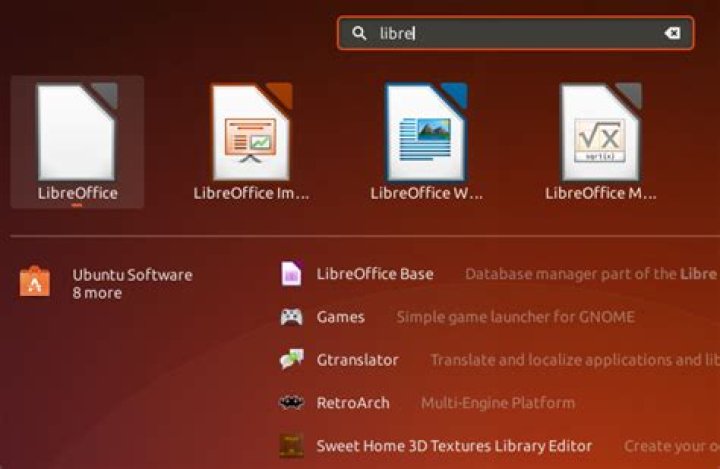
I have an Ubuntu 17.10 installation that came with LibreOffice pre-installed. When I open LibreOffice Writer, it shows up with a blank icon in the taskbar (i.e. the app dock) on the left (1st screenshot). If I drag-n'-drop the app from the full-screen app launcher to the dock (i.e. add to the Favorites) and launch the app, it still opens up with a blank icon (2nd screenshot). In fact, any LibreOffice app opens with the same blank icon, be it Writer, Impress, or Calc. The LibreOffice suite itself also shows up as a blank icon in the app launcher (3rd screenshot).
This doesn't affect the performance of the app in any way, shape, or form, but this defect annoys the hell out of me, and it also makes it more difficult to differentiate between the LibreOffice apps, when you have many open simultaneously.
Hope someone can suggest a trick to fix this! Thanks
Edit
/usr/share/applications/libreoffice-writer.desktop contents:
[Desktop Entry]
Version=1.0
Terminal=false
Icon=libreoffice-writer
Type=Application
Categories=Office;WordProcessor;
Exec=libreoffice --writer %U
MimeType=application/vnd.oasis.opendocument.text;application/vnd.oasis.opendocument.text-template;application/vnd.oasis.opendocument.text-web;application/vnd.oasis.opendocument.text-master;application/vnd.oasis.opendocument.text-master-template;application/vnd.sun.xml.writer;application/vnd.sun.xml.writer.template;application/vnd.sun.xml.writer.global;application/msword;application/vnd.ms-word;application/x-doc;application/x-hwp;application/rtf;text/rtf;application/vnd.wordperfect;application/wordperfect;application/vnd.lotus-wordpro;application/vnd.openxmlformats-officedocument.wordprocessingml.document;application/vnd.ms-word.document.macroenabled.12;application/vnd.openxmlformats-officedocument.wordprocessingml.template;application/vnd.ms-word.template.macroenabled.12;application/vnd.ms-works;application/vnd.stardivision.writer-global;application/x-extension-txt;application/x-t602;text/plain;application/vnd.oasis.opendocument.text-flat-xml;application/x-fictionbook+xml;application/macwriteii;application/x-aportisdoc;application/prs.plucker;application/vnd.palm;application/clarisworks;application/x-sony-bbeb;application/x-abiword;application/x-iwork-pages-sffpages;application/x-mswrite;application/x-starwriter;
Name=LibreOffice Writer
GenericName=Word Processor
# More translations here and what not...
StartupNotify=true
X-GIO-NoFuse=true
Keywords=Text;Letter;Fax;Document;OpenDocument Text;Microsoft Word;Microsoft Works;Lotus WordPro;OpenOffice Writer;CV;odt;doc;docx;rtf;
InitialPreference=5
StartupWMClass=libreoffice-writer
X-KDE-Protocols=file,http,ftp,webdav
Actions=NewDocument;
[Desktop Action NewDocument]
Name=New Document
# Yet more translations below...
Exec=libreoffice --writerKnow someone who can answer? Share a link to this question via email, Twitter, or Facebook.
More in general

"Zoraya ter Beek, age 29, just died by assisted suicide in the Netherlands. She was physically healthy, but psychologically depressed. It's an abomination that an entire society would actively facilitate, even encourage, someone ending their own life because they had no hope. Th…"

