Microsoft Excel. Shelf life: calculate on which day % left equals 75
By Daniel Rodriguez •
A = manufacturing date
B = expiry date
c = today's date
I'm using this formula to calculate the % left on today's date
((expiry date - today's date)/(expiry date - manufacturing date))*100example
(01/01/2025 - 08/08/2021) / (01/01/2025 - 01/01/2021) = 85% which excel formula could I use to calculate on which day the % equals 75%?
Like this online calculator does:
2 Answers
Let :
a = expiry date
b = some date
c = manufacturing date
Then :
(a - b)/(a - c)= 75% = 0.75Rearrange :
(a - b) = 0.75 * (a - c) - b = (0.75*(a - c)) - a b = a - (0.75*(a - c))So your formula should be :
some date = expiry date - (0.75*(expiry date - manufacturing date))Please share if it works/understandable/not. ( :
In my opinion, you may simplify the formula for finding the target date first.
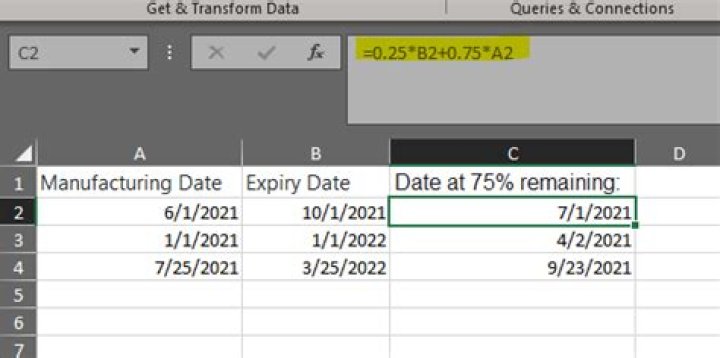
For example, A = manufacturing date, B = expiry date, C = Date at 75% remaining.
Then you could get as following:
(B-C)/(B-A)=0.75
C=0.25*B+0.75A
Then you may use the formula =0.25*B2+0.75*A2 in C2 on my sample, please remember to set the cells with results as Date.


