Read-only partition, dual boot WIn10
I am no longer able to write on the data partition files in Ubuntu, due to a "read-only" message appearing.
I have 3 partitions: one has Ubuntu installed (1), one is for Win10 (2) (dual boot) and the 3rd (3) is for data storage.
Today I updated Win10 and I am no longer able to access the data storage (3) partition from Ubuntu. Usually this error appears when I access Ubuntu while Win10 is not shut down but hibernated. Instead this time the error appears even if Win10 is shut down!
I don't get what's going on. Any clue?
6 Answers
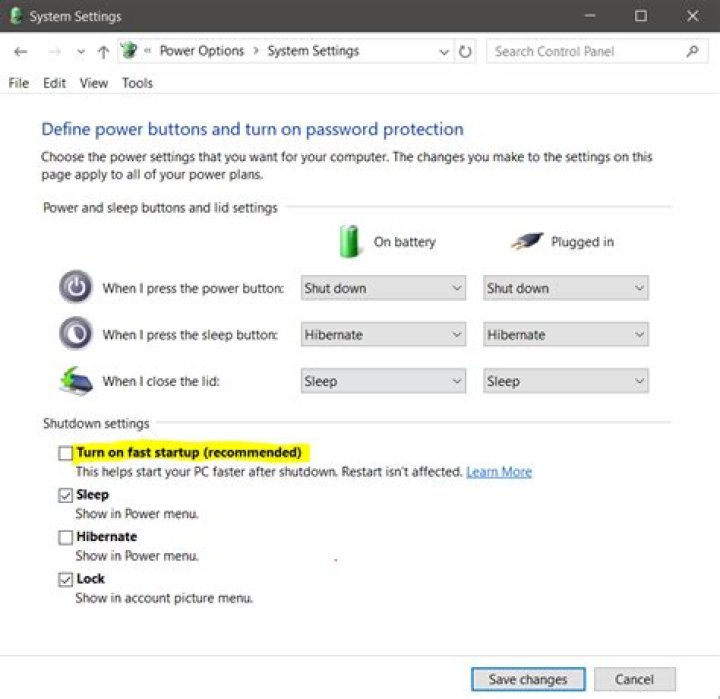
The Windows 10 update reseted it to the default fast startup which is a form of hibernation.
You need to disable this feature (again, probably) in Windows and then shutdown, not reboot. Once done properly you'll be able to access the data partition normally with read/write permissions.
Open the terminal and write the command
sudo fdisk -lIt will show your file system
identify the partition you want permission for read and write
then type the command and give the partition name like this to your specific sda
sudo ntfsfix /dev/sda3You may encounter this filesystem error while in dual boot.
Sometimes the feature "Disable Fastboot" is prohibited to change by non-admin user by group policy restriction.
The below solution will help for all situations.
Login to windows, close all opened windows if any and execute following, from Run dialog
`shutdown /f /r /t 0`/f Force running applications to close without forewarning users.
/r Full shutdown and restart the computer.
1/t xxx Set the time-out period before shutdown to xxx seconds, here /t 0 for immediate shutdown.
Windows is hibernated, refused to mount
Chances are that Windows really is hibernated. Windows does this automatically when you tell it to shutdown normally. The benefit is that you get a faster apparent start-up time.
To shutdown Windows without hybernating, issue the following at a command-prompt (in Windows):
shutdown /sYou might also want include /t 0 for immediate shutdown.
I found a nice tutorial to set up a launcher for this: How to Do a Full Shutdown in Windows 8 Without Disabling Hybrid Boot.
The simpler approach to actually shutting down Windows is to 'restart' (rather than 'shutdown'), but then intercept the boot process and boot Linux instead of letting it boot Windows.
credit:nobar
for me it was solution to restart from Linux go to windows, restart from windows and go bask to Linux. I guess windows did not close some permissions.
1You have to disable Hibernation Windows 10/11
Press the Windows button on the keyboard to open Start menu or Start screen. Search for cmd . In the search results list, right-click Command Prompt, and then select Run as Administrator. When you are prompted by User Account Control, select Continue. At the command prompt, type powercfg.exe /hibernate off, and then press Enter. Type exit, and then press Enter to close the Command Prompt window. Than disable the fast startup in the power options as well.


