Set up a Serial-to-Ethernet Converter With a Virtual Serial Port
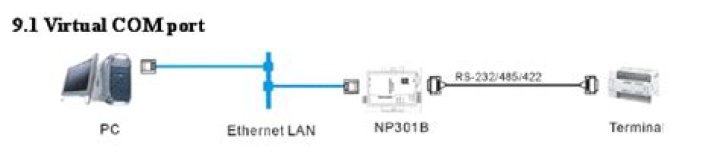
I have a '3one data' brand serial-to ethernet converter, that plugs into a serial device at one end, and allows bidirectional communications with the device over an ethernet connection, like this:
There is supposedly a way to set up a virtual serial port in Ubuntu, which maps to the IP and port of this device and allows transparent communication with the real serial device on the other end. Unfortunately there was no linux documentation accompanying this device, despite the fact that linux support was prominently advertised.
I am struggling with setting up this virtual serial port in Ubuntu, which I believe should be achieved through the ttyd command. However, with the device connected (I can telnet into it directly), if I run:
sudo ttyd -d /dev/ttyp1 192.168.1.25 50000 -b 115200 -p 8NC0my understanding is that a new virtual serial device should be created, /dev/ttyp1, but this doesn't happen. The ttyd command above does not throw any errors.
3 Answers
OP has brought another device:
1That was a typo. Fixed now. I came to the conclusion that this device requires a kernel driver (that doesn't exist), so I ended up getting another device - a Moxa Nport 5250A Serial Device Server, which has drivers for 2.4-2.6 kernels. It seems to be working well. I'm sure the original 3one data device would have worked if they actually wrote a driver for it.
I have not worked with that brand before, but most such devices use the telnet protocol for network communications. Depending on what you are wanting to do, the simplest solution is often to just have your program connect over telnet. Less simply, I recall there being a few programs in the repository for redirecting serial ports over the network, but I can not remember their names.
If the protocol the device uses for network communication is proprietary, you may well be out of luck.
Did you try just telneting into the device? Looking at the datasheet it looks like it's pretty basic. Presuming the ip address is 192.168.1.25 and port 50000:
telnet 192.168.1.25 50000

