Wake-On-LAN for ASROCK H81M-ITX
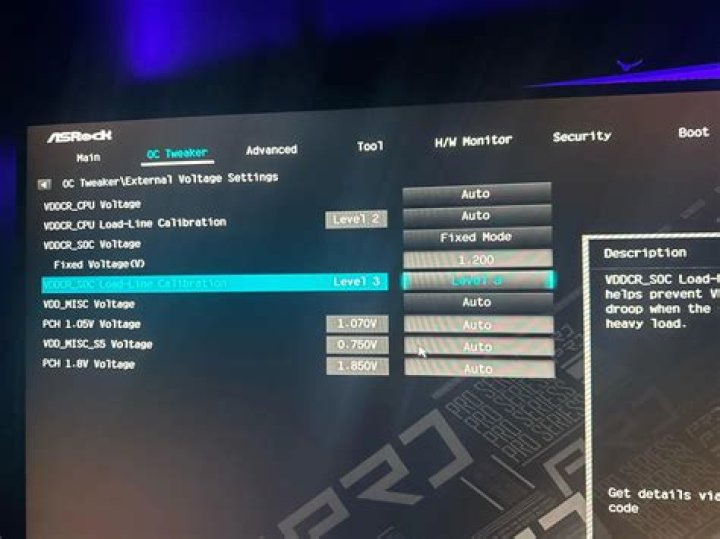
I'm using Ubuntu 14.04.1 on an ASROCK H81M-ITX motherboard. I'm pretty sure I have the BIOS configured correctly for wake-on-lan. I read this forum post about what you need to do from the ubuntu side to make WOL work.
But I get this error when trying to enable WOL:
sudo ethtool -s eth0 wol g
Cannot get current wake-on-lan settings: Operation not supported not setting wolHere's the ethtool dump for eth0. (What is the meaning of the wol in the ouptut?)
$ sudo ethtool eth0
Settings for eth0: Supported ports: [ TP ] Supported link modes: 10baseT/Half 10baseT/Full 100baseT/Half 100baseT/Full 1000baseT/Full Supported pause frame use: Symmetric Receive-only Supports auto-negotiation: Yes Advertised link modes: 10baseT/Half 10baseT/Full 100baseT/Half 100baseT/Full 1000baseT/Full Advertised pause frame use: Symmetric Advertised auto-negotiation: Yes Speed: 1000Mb/s Duplex: Full Port: Twisted Pair PHYAD: 0 Transceiver: internal Auto-negotiation: on MDI-X: Unknown Current message level: 0x000060e4 (24804) link ifup rx_err tx_err hw wol Link detected: yesThe manual for the H81M-ITX has two configuration settings that refer to waking from a lan:
Boot From Onboard LAN: Allow the system to be waked up by the onboard LAN.
PCIE Device Power On: Allow the system to be waked up by a PCIE device and enable wake on LAN.
I'm actually using the onboard LAN, but I have both enabled anyway.
When I shutdown, I'm using:
$sudo shutdown -P now
After the shutdown, the link light goes off for the LAN connection on both the motherboard, and at the hub where it's connected. It appears to have no power. Do I need to shutdown in a different way to preserve power to the ethernet port?
Here are all the BIOS configuration settings that I found that had to do with sleep states (power saving). These are their current settings which they were preset at the factory:
- CPU C States Support:
Auto - Enhanced Halt State (C1E):
Auto - CPU C3 State Support:
Auto - CPU C6 State Support:
Auto - CPU C7 State Support:
Auto - Package C State Support:
Disabled
Each of these 6 configuration items have 3 possible settings: auto, enabled and disabled. The last item (which is the only one that's disabled) has a description, "Enable CPU, PCIe, Memory, Graphics C State Suppport for power saving." Does anything here look amiss?
2 Answers
Many, but not all ethernet devices support Wake on LAN. Check:
sudo ethtool eth0 | grep -i wakeIf it is not supported in your device, there is no known method to force it to do what it wasn't ever designed to do.
If WoL is reported as not supported, you might check the BIOS in Chipset Configuration. What is the Deep Sleep option set to? You may need it set to S5 for the NIC to remain active after a shutdown.
0So a tech support representative from ASROCK was kind enough to research this and found information about this problem. Apparently wake-on-lan support was removed from the Ubuntu drivers for the on-board Qualcomm Atheros ethernet due to some related problem. I don't fully understand the root of the problem, and I'm not too excited about the prospect of trying to patch in older versions of the Atheros drivers to try to recover this functionality that apparently worked in older releases of Ubuntu. I may try to find a different motherboard that doesn't use an Atheros-based ethernet.
Some references:
- Any updates on Wake on LAN functionality being restored for Atheros cards?
- Qualcomm Atheros AR8171 Wake on LAN issues
I have such a bad reputation, I can only post two active links. I feel so dirty. :) Here's another useful reference :
Bug 61651 - [regression] Wake-on-LAN broken in alx (AR8161)
2More in general

"Zoraya ter Beek, age 29, just died by assisted suicide in the Netherlands. She was physically healthy, but psychologically depressed. It's an abomination that an entire society would actively facilitate, even encourage, someone ending their own life because they had no hope. Th…"

