Where can I get the 11.04 kernel .config file?
I'm using Maverick with the latest available kernels on kernel.org and building them myself. Until now I've been basing my configuration off the stock Maverick kernel and accepting the make oldconfig defaults. I've been doing this for 3 major releases now so I figure I'm starting to slip behind the current "standard".
I would like to re-base my kernels off the new Natty .config file. Is this available somewhere online or do I have to download the whole kernel package and extract it?
Edit: I've manually pulled in the config from the latest Natty kernel package and I can confirm that I propbably should have done this sooner. A lot of differences between my old "evolved" config and the Natty default. Now if I could just do this without 20 minutes of hunting and downloading the package so I can re-base in the future.
4 Answers
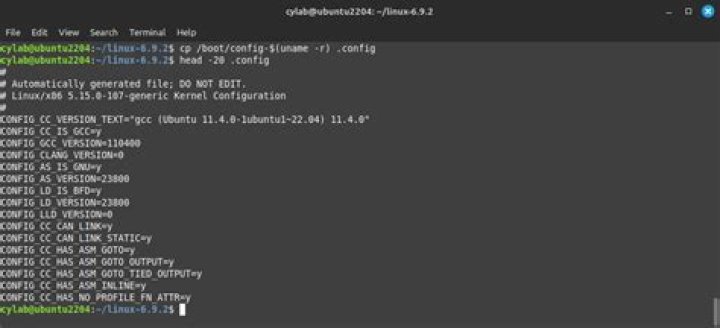
Each linux-image package contains the exact configuration file that it was built with in /boot/config-*. To see the configuration file for the currently running Linux kernel, do:
less /boot/config-$(uname -r)
I have checked with the Ubuntu kernel people (on Freenode #ubuntu-kernel) and they have confirmed my belief that there isn't really "the config", but it is actually constructed at build/compile time by including a number of Kconfig files; these depend on the exact architecture and target (desktop/server/cloud). You should be able to read that (short) conversation at:
A list of that variety can be found using packages.ubuntu.com and the following search:
Hunting, around, it would appear that the .config is also included in the linux-headers-* packages. These are .deb files (which are simple .ar archives that will open with file-roller) and only about 800 kB each. If you know the particular target, architecture and version you're after, you can grab these straight from Launchpad or from the archive itself:
- linux-header-2.6*.deb
- then look in
/usr/src/linux-headers-2.6*/.config
If you want to automate the whole process into one command, you could try the following; make sure you keep it all on one line!
wget -qO- | dpkg-deb --fsys-tarfile /dev/stdin | tar Ox --wildcards './usr/src/*/.config'
Hope that helps!
2The kernel team has posted the configs for Natty here:
Sources:
- Mailing list post
- Wiki page detailing the changes between 10.10 and 11.04
On my Ubuntu 11.10 system the kernel config is in the file '/boot/config-3.0.0-12-generic'.
1Ubuntu git kernel repository
The debian/ metadata which contains the configs, and the kernel tree are tracked both in a single git repository per release:
The repo then has a tag for each kernel package, e.g. in my Ubuntu 18.04, I have the package linux-image-4.15.0-36-generic, which I'm guessing corresponds to the tag: Ubuntu-4.15.0-36.39.
explains how to compile the kernel, and therefore how to configure it and how configs are merged into the final config.
The configs all seem to be under which contains:
config.common.ubuntu
config.common.ports
amd64/config.common.amd64
amd64/config.flavour.generic
amd64/config.flavour.lowlatency
so I'm guessing that linux-image-4.15.0-36-generic will merge config.common.ubuntu, config.common.amd64 and config.flavour.generic.
The script that does the merging seems to be debian/scripts/misc/kernelconfig and it contains the comment:
# Merge configs
# We merge config.common.ubuntu + config.common.<arch> +
# config.flavour.<flavour>
TODO: there is also an file which seems to contain the value for each config for each arch, how is that used?
Someone should confirm all that by running build scripts in verbose mode somehow, but I'm lazy now, you can build with:
git clone git:// linux
cd linux
git checkout Ubuntu-4.15.0-36.39
fakeroot debian/rules clean
debian/rules updateconfigs
fakeroot debian/rules build-generic
I have then confirmed that this produces the exact same config that I have locally:
diff debian/build/build-generic/.config /boot/config-4.15.0-36-genericNote that the Ubuntu kernel git repo also has thousands of patches on top of upstream Linux, so just getting the right config won't be enough to reproduce behavior.
We can also triple check that the kernel we built matches the packaged one by looking at the start of dmesg of the boot, which contains:
[ 0.000000] Linux version 4.15.0-36-generic (buildd@lgw01-amd64-031) (gcc version 7.3.0 (Ubuntu 7.3.0-16ubuntu3)) #39-Ubuntu SMP Mon Sep 24 16:19:09 UTC 2018 (Ubuntu 4.15.0-36.39-generic 4.15.18)Config in the .deb
As mentioned by others, the final full config is also present under:
/boot/config-4.15.0-36-genericwhich correspond to each Linux kernel image:
/boot/vmlinuz-4.15.0-36-genericSo, for other versions, we can find from which package those come from:
dpkg -S /boot/config-4.15.0-36-genericwhich gives:
linux-modules-4.15.0-36-generic: /boot/config-4.15.0-36-genericand then you can just download the .deb from and extract it to get the config:
mkdir config
cd config
wget
ar x linux-modules-4.15.0-36-generic_4.15.0-36.39_amd64.deb
tar -xvf data.tar.xz
cat ./boot/config-4.15.0-36-generic
Tested in Ubuntu 18.04.
More in general

"Zoraya ter Beek, age 29, just died by assisted suicide in the Netherlands. She was physically healthy, but psychologically depressed. It's an abomination that an entire society would actively facilitate, even encourage, someone ending their own life because they had no hope. Th…"

